Dynamics 365 Solution Architecture Overview
This section discusses the steps needed to integrate InRule with Microsoft's online version of Microsoft Dynamics 365. Using this scenario InRule components are hosted on Microsoft Azure.
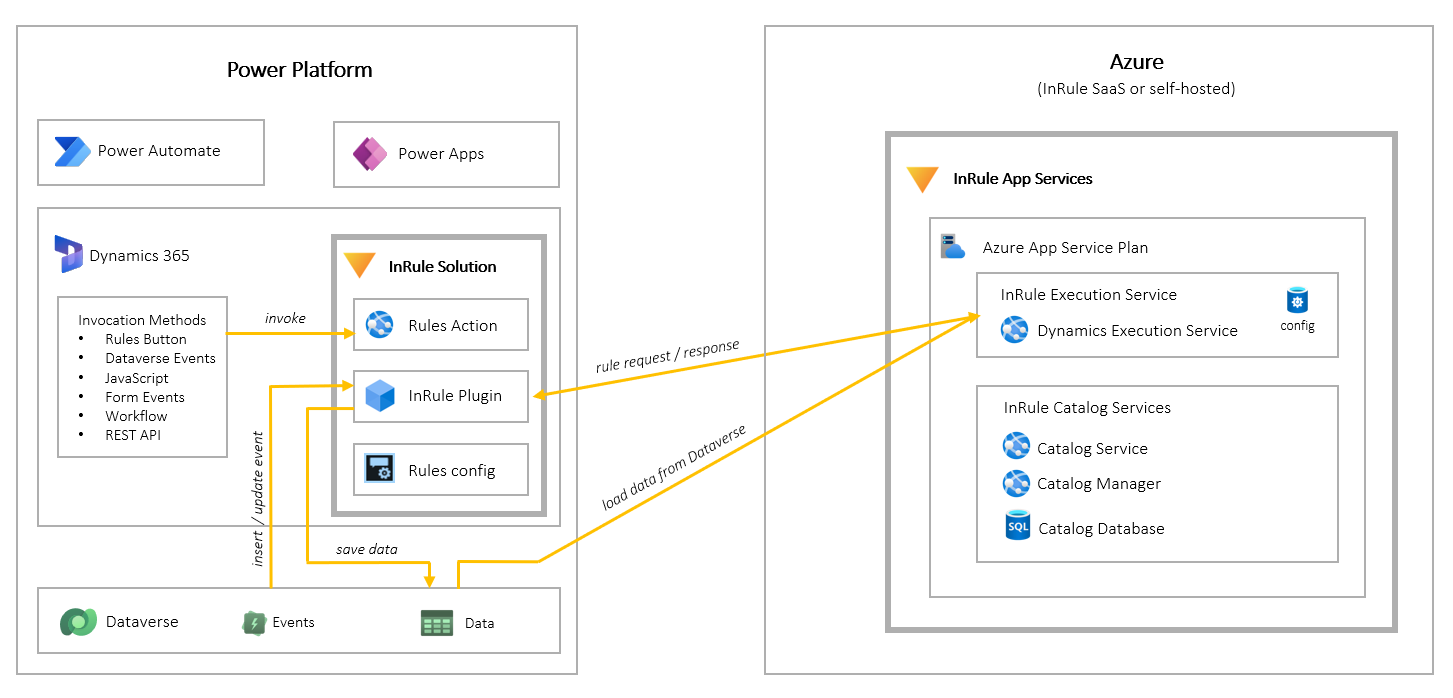
Rule Execution App Service for Dynamics 365
The Rule Execution App Service is responsible for loading Dynamics entity data, executing rules against loaded data, and responding to Dynamics with rule execution results.
InRule Solution for Dynamics 365
The InRule Solution contains a custom plugin, an endpoint, client resources, a configuration form, and a security role called InRule Integration Administrator. This role is created during deployment, but the entity privileges will need to be manually assigned to the role. It is possible for a different role to be used if desired. For more information, please refer to Dataverse Connectivity and Authorization.
Catalog App Service and Azure SQL Database
A Catalog service will be used to store Rule Apps that will be consumed by the Rule Execution App Service. This Catalog Service will be hosted as an Azure App Service. The back end of the Catalog Service utilizes an Azure SQL Database for retrieval and persistence of Rule Applications.