Dynamics 365 On-Premises Components
This section discusses the steps needed to integrate InRule with Microsoft's on-premises version of Microsoft Dynamics.
This section assumes that you already have an IIS web server and an on-premises version of Dynamics deployed and configured.
An Overview of the Components Needed
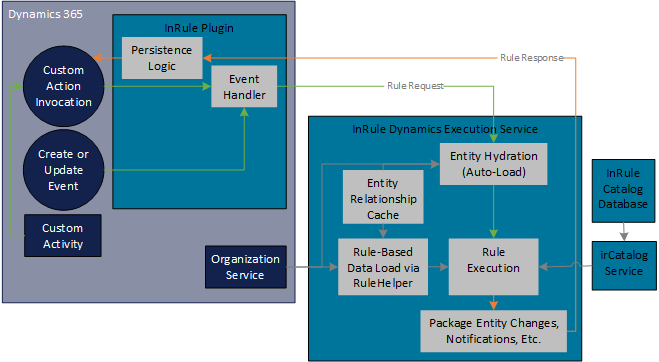
Catalog Web Service and Database
A Catalog service will be used to store Rule Apps that will be consumed by the Rule Execution Service. This Catalog Service will be hosted as a web service on an IIS server. The back end of the Catalog Service utilizes a SQL Server or Oracle database for retrieval and persistence of Rule Applications. The Installation Documentation and InRule Installer, which will be used to install the service itself, are available on our support website's downloads section and provide instructions for setting up the catalog.
Rule Execution Web Service for Dynamics 365 On-Premises
The WCF Web Service implementation is designed to be generically applied to any given Dynamics Entity and corresponding InRule rules that may apply to that Entity. After the web service is published, the service can be directed to run various Rule Applications against different Entity types by passing arguments in the REST calls. This will require a separate deployment than the Catalog Web Service; this process will be covered in the "Deploy the Rule Execution Web Service" section.
InRule Solution for Dynamics 365 On-Premises
The RuleExecutionServices solution contains a custom plugin, client resources, and a configuration form. Unlike the Online solution, this is configured to work directly against the execution service, rather than requiring the "middle-man" of the Azure Relay.