Dynamics 365 Endpoint Override Configuration
As of version 5.5, InRule for Dynamics now supports Overriding Endpoint Configuration via Azure App Service App Settings. This allows for the overriding of various endpoint settings configured on a rule app, such as REST API URLs or Database Connection Strings, by setting App Settings on your execution service App Service.
To set an endpoint override on your app service, simply navigate to your rule execution app service and go to the Configuration view:
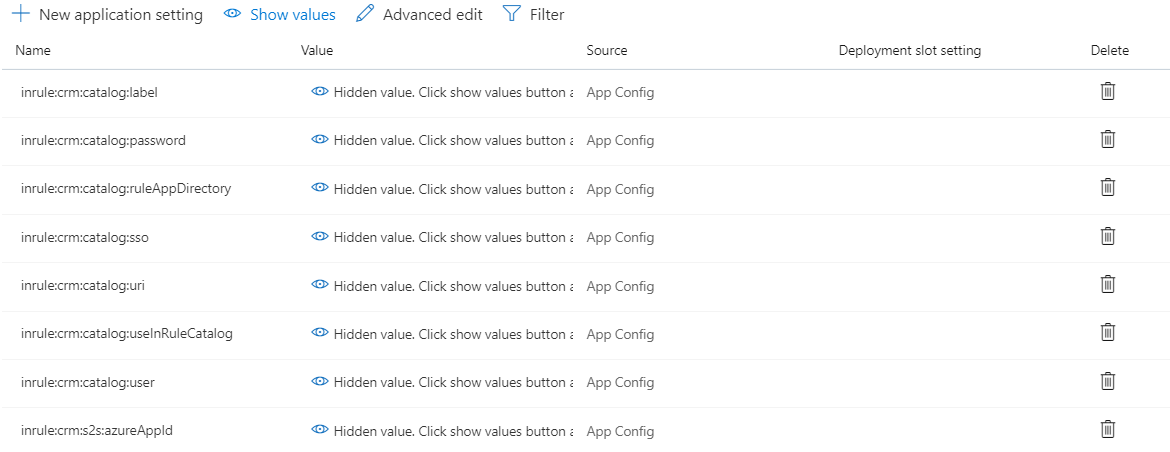
Select New Application Setting

The name of the override uses the following convention:
inrule:runtime:overrides:<YourEndpointNameHere>:<OverrideType>:<OverrideSetting>
Your endpoint name should match the name of the endpoint or data object in the rule app you wish to override. The available override types are:
| AppSettings Key | Description |
|---|---|
inrule:runtime:overrides:<endpoint-name>:DatabaseConnection:ConnectionString | (string) Database connection string. |
inrule:runtime:overrides:<endpoint-name>:SendMailServer:ServerAddress | (string) Mail server host name. |
inrule:runtime:overrides:<endpoint-name>:WebService:WsdlUri | (string) Web service WSDL URI. |
inrule:runtime:overrides:<endpoint-name>:WebService:ServiceUriOverride | (string) Web service SOAP end point URI. |
inrule:runtime:overrides:<endpoint-name>:WebService:WebServiceMaxReceivedMessageSize | (integer) Web service client max received message size in bytes. (max 2147483647) |
inrule:runtime:overrides:<endpoint-name>:XmlDocumentPath:XmlPath | (string) XML document file path on Runtime Service. |
inrule:runtime:overrides:<endpoint-name>:XmlSchema:XsdPath | (string) XML schema path or URL. |
inrule:runtime:overrides:<endpoint-name>:XmlSchema:EnableXsdValidation | (boolean) Whether to validate XML Entity state against XSD. (true or false) |
inrule:runtime:overrides:<endpoint-name>:RestService:RestServiceRootUrl | (string) REST service root URL. |
inrule:runtime:overrides:<endpoint-name>:RestService:AuthenticationType | (string) REST service authentication type. (None, Basic, NTLM, Kerberos, Custom) |
inrule:runtime:overrides:<endpoint-name>:RestService:RestServiceUserName | (string) REST service authentication username. |
inrule:runtime:overrides:<endpoint-name>:RestService:RestServicePassword | (string) REST service authentication password. |
inrule:runtime:overrides:<endpoint-name>:RestService:RestServiceDomain | (string) REST service authentication domain. |
inrule:runtime:overrides:<endpoint-name>:RestService:RestServiceX509CertificatePath | (string) REST service X509 client certificate path on Runtime Service. |
inrule:runtime:overrides:<endpoint-name>:RestService:RestServiceX509CertificatePassword | (string) REST service X509 client certificate password. |
inrule:runtime:overrides:<endpoint-name>:RestService:RestServiceAllowUntrustedCertificates | (boolean) Whether to allow REST service certificates not signed by trusted CA. (true or false) |
inrule:runtime:overrides:<dataElement-name>:SqlQuery:Query | (string) SQL query text. |
inrule:runtime:overrides:<dataElement-name>:InlineTable:TableSettings | (string) XML serialized string of TableSettings object. (see 1.) |
inrule:runtime:overrides:<dataElement-name>:InlineValueList:ValueListItems | (string) XML serialized string of ValueListItem collection (see 2.) |
inrule:runtime:overrides:<dataElement-name>:InlineXmlDocument:InlineXml | (string) XML document. |
inrule:runtime:overrides:<dataelement-name>:RestOperation:UriTemplate | (string) REST operation URI template |
inrule:runtime:overrides:<dataelement-name>:RestOperation:Body | (string) REST operation body |
inrule:runtime:overrides:<dataelement-name>:RestOperation:Headers:<header-name> | (string) REST operation header |
The endpoint setting is the name of the setting to override for that Endpoint Type. Some Endpoint Types have several Endpoint Settings; the available settings for each Endpoint Type can be read about in the InRule support site documentation.
Below is what a properly configured end-result would look like, using a DatabaseConnection override as an example:
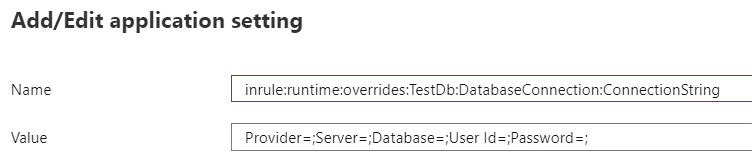
The value of the override App Setting would then be set to whatever value you wish to override with. Once your override is set, simply save the changes to your app service. Upon the next execution of rules, the specified endpoint type will be overridden with the supplied value.
Rest Service Override
Unlike other override types, the RestService override type is made of multiple sub-types listed below. When overriding a rest service endpoint, only include the 'RestService' override type in the key, not the sub-type. For example, if overriding the rest service certificate path, you would need to create two app settings with the following keys:
inrule:runtime:overrides:YourRestServiceName:RestService:RestServiceX509CertificatePath
inrule:runtime:overrides:YourRestServiceName:RestService:RestServiceX509CertificatePassword
The following are the RestService override sub-types and associated settings
- RestServiceRootUrl
- RestServiceRootUrl
- RestServiceAuthenticationType
- AuthenticationType
- RestServiceUserName
- RestServicePassword
- RestServiceDomain
- RestServiceX509CertificatePath
- RestServiceX509CertificatePath
- RestServiceX509CertificatePassword
- RestServiceAllowUntrustedCertificates
- RestServiceAllowUntrustedCertificates
If an override type contains multiple settings, like RestServiceX509CertificatePath or RestServiceAuthenticationType, be sure to include an App Setting for each of the settings listed in the documentation.