Dynamics 365 General Authoring and Integration Concepts
Runtime Mapping across Nested Relationships
Much like Dynamics 365, the InRule rule engine offers strong support for hierarchical and relational data. Within a given Rule Application, data can be considered across parent-child relationships within a single rule request. These relationships can take the form of Collections (1 - * relationships) or 1 – 1 relationships.
When N:N relationships are imported into InRule, they behave as 1:N Collection relationships within the Rule Application.
In addition to the abilities of both products to handle relational data, both products also offer the ability to declaratively configure "Entities" and "Fields". Both products also allow for different strongly-typed Entities and Fields to be accessed with loosely-typed SDK interfaces. Because of these inherent similarities and flexible interfaces, it is possible to build a reusable mapping component that can convert any given graph of loosely typed Dynamics Entities to InRule Entities, and vice versa.
Controlling irVerify Behavior with Load, Save, and Inactive Record Settings
When working with a tree composed of many related Dynamics Entities, it is often useful to have explicit control over which relationships are either automatically loaded or automatically considered in change detection for persistence. If a relationship is skipped during the initial load routines, then it is available to be conditionally populated later using rules.
In the irX rule authoring ribbon, there are three buttons that give the rule author the control to denote if a relationship should be automatically loaded, saved, or have inactive records excluded.

Automatic loading and saving is enabled by default for all relationships that are imported from Dynamics. The rule author can opt-out of these automatic behaviors by unselecting Auto Load or Auto Save. When these buttons are selected, metadata attributes are written into the Rule Application for the given relationship. These metadata attributes are used by the irVerify data loader when recursively loading data or detecting changes for persistence.
If loading or saving is disabled for a given relationship, then it is also disabled for all Entities that are children of that relationship.
Since Microsoft Dynamics 365 uses the "inactive" status to do a soft delete of records, it is possible to include both active and inactive records when loading a Collection or relationship. You can use the Exclude Inactive button to exclude inactive records, returning only active records. To ensure that this feature works correctly, the child Entity of the Collection or relationship should map the Dynamics 365 Status field.
Polymorphic Lookups
Usually, when setting up an entity relationship in Dynamics, the relationship can only apply to one entity type. But, polymorphic lookups can refer to any of the entity types that are set up for the relationship. For instance, a 'Payment' entity could be linked to many different kinds of custom entities that represent items that can be bought in a company.
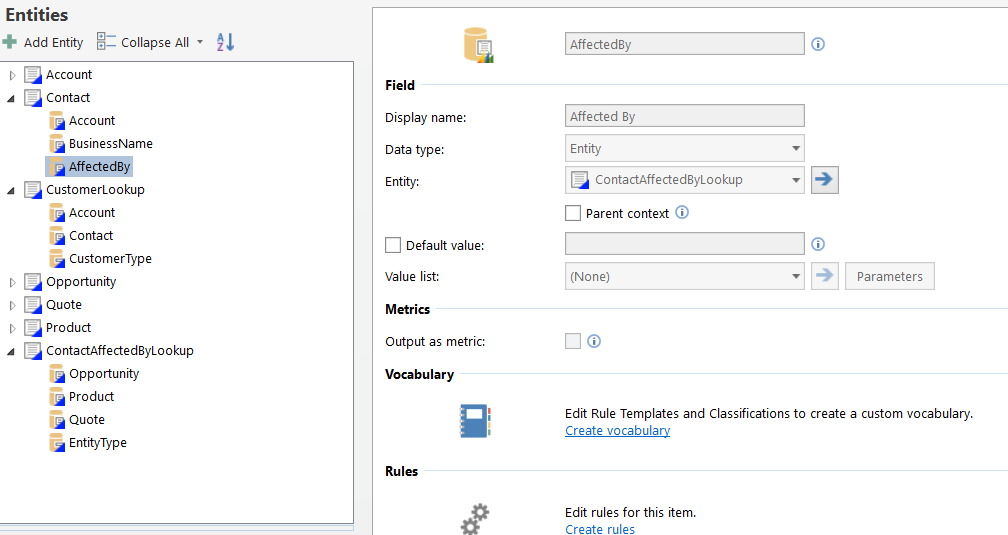
Just like Dynamics, InRule entity relationships usually point to only one type of entity. When importing polymorphic lookups in the irX schema manager, a special linking entity is created automatically in the rule app. This linking entity has a type field that shows which entity type is being used, and one linking field for each possible entity type in the relationship. These values will be populated at runtime and allow writing rules to say if Entity Type = Course, then… or if Entity Type = Book, then…
In the below example, the AffectedBy field on Contact is a polymorphic field that can be of type Opportunity or Quote. When importing the AffectedBy field, it will generate an associated entity called ContactAffectedBy that is used as a container to represent the variable relationship to Opportunity or Quote. This pattern will be used for each polymorphic entity imported in the schema and will allow for the reading and setting of associated entity references.
For more information about using Polymorphic Lookups with InRule, visit the tutorial.