Introduction to Decision Services
InRule is proud to release its latest APIs for discoverable and frictionless execution of decisions and rules. Decision Services are provided as two APIs-in-one including the newly designed Decision API and a modernized version of our classic Rule Execution API.
The classic irServer Rule Execution Service is being retired with the 5.9.0 release in November 2025. Please plan on transitioning your calling application to use either the new Decision API or the backward-compatible Rule Execution API. See Rule Execution API vs. classic irServer for full list of migration considerations.
API Overview
Decision API
The Decision API is our new modern API that is designed to provide simplicity and an intuitive user experience when executing your decisions and rules.
- InRule's newly designed, modern API - tailored for simplicity and ease of use
- Generates Swagger for all of your decision and rule set endpoints by rule application
- Simplified request/response model
- When in doubt, use this API
- Explore the Decision API
Rule Execution API
- InRule's classic Rule Execution API - enhanced and fully functional
- Replaces irServer - Rule Execution Service
- JSON encoding is no longer required
- Use this API when you need backward compatibility or advanced rule execution metadata
- Explore the Rule Execution API
Shared API features
- NET 8 Web API with cross-platform portability
- OpenAPI 2.1 compliant
- Descriptive Swagger pages with test capability
- API Key and OAuth 2.0 authentication
- Auto-scaling with health monitoring
- Status endpoint
Understanding which API to use depends on your application's specific use case and integration needs. In general, the Decision API should be the preferred API unless there are specific technical reasons requiring the use of the Rule Execution API.
Locating Decision Services in the InRule Portal
Hover over the Decisioning menu in the InRule portal. In the drop-down, select Execution and then select Decision API in the sub-menu.
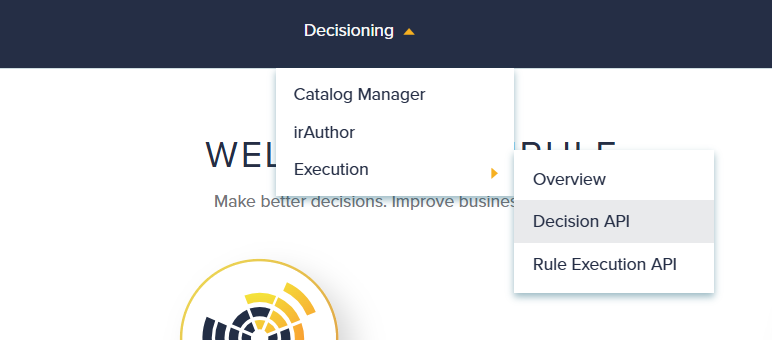
This will take you to the Swagger pages for the Decision API and the Rule Execution API. Additional descriptions for these APIs are contained in their respective help articles along with details of the Swagger for each API.
Locating your URLs and API Keys
Locating your URLs:
-
The URLs to use for Decision Services can be found in the InRule Portal by clicking on the cog icon in the top right corner of the page and navigating to Provisioned Resources.

-
Select Provisioned Resources.

-
From the Provisioned Resources page, expand the Execution - Decision Services section to access the URLs.
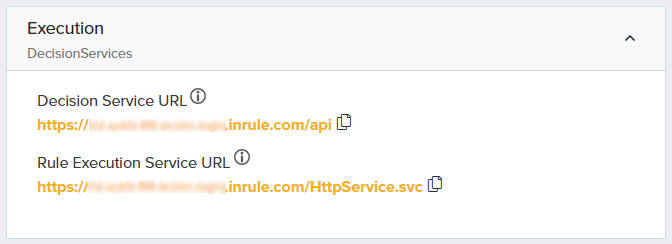
Locating your API Keys:
-
The API Keys to use for Decision Services, as well as the Dynamics and Salesforce Execution Services can be found in the InRule Portal by clicking on the cog icon in the top right corner of the page and navigating to Configuration.
-
Select Configuration.

-
From the Configuration page, expand the Execution Server Settings dropdown to access the Authentication section where you will find your Primary and Secondary API Keys.

The ability to regenerate an API Key is provided through the on-hover menu for the selected key.
When calling either API from code or a tool such as Postman, the API Key must be set as a Header in the POST request.
Key: inrule-apikey Value: {your API Key}
For the Rule Execution API, the legacy API Key format using the "Authorization" header will remain active, but you should migrate to the new header format at your earliest convenience.
Authenticating with OAuth 2.0
OAuth 2.0 is now a supported alternative to using an API Key for authenticating with Decision Services. Common approaches can be leveraged to acquire and cache a JWT access token from either an Auth0 or EntraId provider using ClientId and ClientSecret. The token can then be passed to Decision Services using a standard Bearer token request header. For InRule SaaS, the ability to self-manage OAuth 2.0 authentication through the SaaS Portal is not yet available and will require additional setup from InRule CloudOps to enable on a per request basis.
Swagger Overview
Swagger is a set of open-source tools built around the OpenAPI Specification that enables users to explore and consume REST APIs. We utilize Swagger to document the base execution APIs as well as all of the decisions and rule sets across your rule applications. The Decision Services Swagger can be used in a variety of ways:
- Swagger UI – Accessed in the InRule Portal for easily running requests to execute decisions and rules.
- External tools – Curl, Postman, etc.
- Author Studio Tester - This UI is generated from the Decision API Swagger.
- Swagger Codegen tools – These tools exist for creating programming libraries directly from OpenAPI definitions and allow you to consume the endpoints programmatically. There are many supported languages. To learn more, visit the GitHub page.
See the following sections for additional Swagger details for each API:
Runtime Startup and Catalog Compilation Settings
Decision Services runtime behavior can be influenced by the Pre-Compile All Rule Apps and Enable Background Compilation settings in Portal Configuration.
Pre-Compile All Rule Apps reduces cold-start delays by compiling rule applications during service startup. This is especially useful during a scale-out of new Decision Service instances, where the setting instructs the instance not to accept new requests until rule application pre-compilation is complete. A configured Rule Application Label can be used to limit the startup pre-compilation set to rule application revisions with that label assigned. If the catalog contains many rule applications that are not executed regularly, this approach can limit pre-compilation to the primary rule applications.
Enable Background Compilation controls whether newly detected catalog rule application revisions are downloaded, compiled, and cached on a background thread while requests continue using the currently cached compiled version.
For the exact setting definitions and configuration details, see Configuration Overview.
Using Dynamics and Salesforce RuleHelper Connectors in Decision Services
Decision Services are now compatible for executing rule applications containing calls to the Dynamics and Salesforce RuleHelper connectors. For InRule SaaS implementations or self-hosted implementations, there are manual steps required to set up this integration.
- For InRule SaaS - Setup must be requested by creating a support ticket via the Support request form or emailing support@inrule.com
- For self-hosted - The DLLs must be manually deployed to the EndpointAssemblies folder per instructions in the Decision Services API Guide - Options for Self-hosting article.